
A five-day design sprint


BACKGROUND
The objective of this five-day design sprint is to familiarize students with agile processes and an adaptive work plans such as Lean UX and Google Venture (GV) sprints. This encourages students to make key business decisions by quickly designing, prototyping, and testing their ideas. Springboard has provided project briefs to choose along with company information and research. For this project, I have chosen Savr Recipes, a new startup that wants to make it easier for people to follow new recipes and cook great meals at home.
TIMELINE
5 days (Monday - Friday)
MY ROLE
UX Designer, UX Researcher, UI Designer
DELIVERABLES
A functional mobile prototype
TOOLS USED
Figma, Google Doc, Adobe Illustrator, Pen + Paper
DESIGN SPRINT SCHEDULE
Prior to beginning, I created a schedule to hold myself accountable to hit daily deliverables throughout the five-day sprint:
MONDAY
Understand the problem, review the research, and establish a design direction.
TUESDAY
Dedicated sketch day: rapidly generate ideas and find inspiration in other apps.
WEDNESDAY
Solidify the design direction, create a storyboard, and lay the foundation for prototyping
THURSDAY
Dedicated prototyping day: create a minimum viable product for the newly designed feature.
FRIDAY
Enact usability testing on participants and gather their feedback.
MONDAY
THE PROBLEM
Savr receives lots of positive feedback on the quality of their recipes, but now they need to help users accurately and easily follow the cooking instructions. Savr has seen some negative reviews about recipes that involve many steps, or more advanced techniques. Many people who were excited about a certain recipe end up disappointed with the outcome because they didn't feel the instructions were clear or easy to execute. Points of confusion included timing, order of steps, and learning new techniques.
Design Constraints:
-
Currently, recipes are written as text in ordered steps from start to finish which Savr would like to maintain.
-
The solution should be designed as a feature for the Savr Recipes native mobile app.
-
Users have expressed positive feedback about finding quality recipes - focus on creating a better experience for users when it's actually time to cook it.
RESEARCH
Savr has provided the preliminary research, mainly user frustrations regarding the confusion or overwhelmingness during the cooking process. I synthesized their frustrations into key insights that I personally empathized with and it helped guide my design decisions moving forward:
-
"...a lot of times I see techniques that I am totally unclear on. I Google Image search or Youtube it, which kind of throws everything off and it means needing to drop what I'm doing to use my phone."
-
"There are some parts I don't enjoy though. Like emptying my cabinets because I don't know what kitchenware I need, or constantly washing my hands so I can refer back to my phone."
-
"...I like to be as prepared as I possibly can be before I start cooking things that I can't undo."
-
"I can see what the finished product looks like, but I don't know if I'm on the right track halfway through... is it supposed to look like this? If not, it's better to know sooner rather than later."
PERSONA
Savr also provided a persona profile along with their research:

Nick, 29, Los Angeles
Behavior:
-
Cooks 3x a week for himself and occasionally his partner.
-
Enjoys trying new recipes and tweaks it as he sees fit.
-
Learns best by following instructions.
Goals:
-
Follow a recipe easily and confidently so dishes come out as expected.
-
Wants new recipes to be enjoyable and challenging, not stressful and chaotic.
Pain Points:
-
Can be unsure if he's on the right track while cooking and is not always clear on what's next.
-
Gets discouraged if the dish doesn't come out as expected, especially if he doesn't know what went wrong.
-
Becomes stressed referring back to his phone anytime a new technique or method is introduced.
HOW MIGHT WE...?
After reviewing and synthesizing the provided research, I reframed the problem into a series of "How Might We" (HMW) questions to act as my north star for the rest of the sprint:
-
How might we clarify recipe instructions to minimize confusion?
-
How might we guide the user through new techniques and methods visually?
-
How might we reduce phone touching so the user can focus their hands on prepping / cooking?
-
How might we instill and nurture confidence in users for long-term retention?
MAPPING THE IMPROVED EXPERIENCE
Drafted the user journey based on my HMW questions and highlighted features with potential:


Then I took some of the ideas above and combined them into one user flow that will provide a better holistic experience:

TUESDAY
DESIGN INSPIRATION
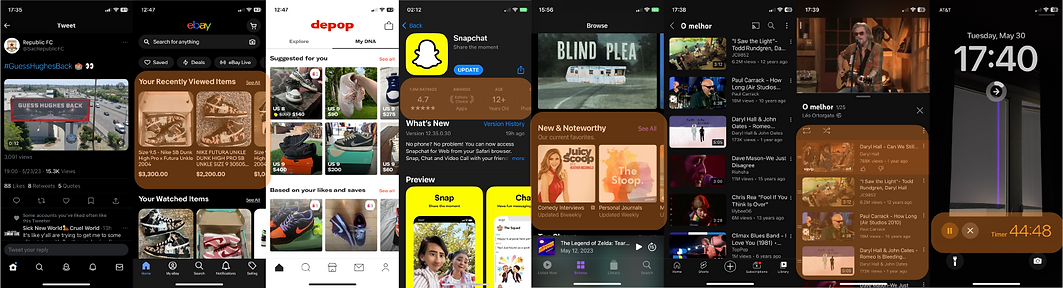
Before sketching, I compiled some inspiration based on what I needed from the user interface:
-
An organized homepage that contains recipes organized by category (cards on eBay, Apple Podcast, and Depop)
-
A screen that provides key attributes of the recipe (app information on Apple's App Store)
-
An easy way to integrate a video player and a list of videos (video playlists on YouTube)
-
A pop-out timer for cooking (the timer on Apple Clock)
IDEATION SKETCHES
Quickly sketched through my ideas, referenced inspiration, and tried to find an interface that's both interesting and intuitive. I mainly focused on the pop-up tutorials and voice-controlled digital assistant and how those flows might look.

WEDNESDAY
STORYBOARDING
Created a step-by-step user storyboard detailing how the user will interact with the app and how its new features will make their experience more enjoyable.


WIREFRAMING
Laid out the user interface for prototyping and visualizing what the user flow will look like on the screen.

FINAL DESIGN SOLUTION
Savr has introduced a set of new features designed to enhance the user's cooking experience. This includes a hands-free, voice-activated experience and a series of helpful tutorial videos.
The prototype on the right is functional, so give it a try!
Note: Some of the interactivity has been truncated to expedite the prototype's flow.
THURSDAY
GETTING STARTED
The user begins by browsing the homepage for delicious recipes. Each recipe will list the difficulty, the cooking duration, and the ingredients and cookware required. If needed, Savr provides the user with a list of substitutes. The user can also scale the recipe depending on how many servings they want to prepare.


YOUR DIGITAL SOUS CHEF, SAVR
Savr isn't just the name of the app, it's also the name of your digital sous chef! Savr is an optional, yet powerful new feature. With simple voice commands, Savr can play the provided video tutorials that will visually teach users new techniques.


HANDS-FREE NAVIGATION
Savr can also navigate through the recipe so the user can focus their hands on cooking rather than rinsing them anytime they need to touch their phone to scroll. Additionally, Savr can set up a cooking timer for you so you can remain hands-free. All you need to say is "Hey Savr, set a timer for 20 minutes" and Savr will handle the rest!


POST-COOKING FEATURES
Not only will the recipe provide you with a delicious meal, it will also give you tips on how to store and reheat any leftovers you may have. Lastly, users are able to rate recipes so that the Savr community will always have the best recipes to cook!


FRIDAY
USABILITY TESTING
The final day of the design sprint was spent validating my prototype to five potential users, some through virtual sessions, others in the proper environment - the kitchen. Keep in mind that the voice command function was replaced with a simple button in a prototype. Here's what they had to say:
POSITIVES
-
Good reception overall to the focus on providing a hands-free experience, particularly the inclusion of a voice-controlled sous chef.
-
General interface was well-received; intuitive and read as a recipe should be.
-
100% of the interviewees completed the task without trouble.
NEGATIVES
-
Some cosmetic woes - inconsistent text size and off-white background color.
-
Needs an audio cue for voice controls - i.e., a simple ping to know when Savr is listening for a command.

REFLECTION
Over the course of this five-day design sprint, I learned the importance of focusing on the problem at hand. There were moments where I wanted to flesh out other features and hone in on the nuance of the project, but it would've resulted in wasted time in a time-sensitive scenario. If I were allotted more time, I would've done another iteration or two during the hi-fi prototyping phase. I also would've liked to add more features that could've encouraged the user to cook more difficult and challenging recipes that would ultimately improve their skills.
Throughout my professional design career outside of UX, I was able to focus on minute details because of the long duration of projects. However during this short timeline, I was forced to make broader strokes quickly and efficiently.